
Tracku Friend Tracker7.3 - App Store
You'll be able to see results in few seconds.
Publisher Description
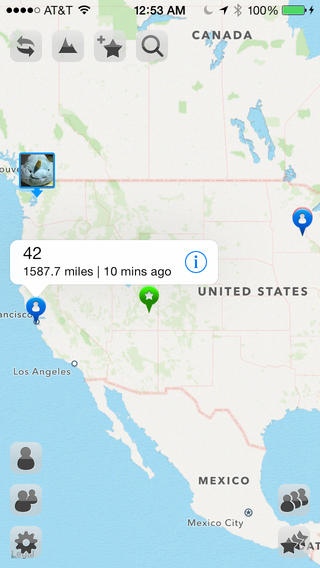
Looking for a pure utility app? Sick of all the social stuff that is embedded everywhere? Tracku is the answer. Tracku is the premium, down to earth personal tracking utility. It does one thing and does one thing well: real-time tracking and sharing location with your authorized friends. Tracku has no social, no user information gathering: we don't even ask you for your email address. All Tracku does is to reliably record you and your friends' current locations and display them on all of the iPhone/iPads's involved.
Tracku is great for finding loved ones, locate all buddies in a hunting trip, or schedule a meet-up in a nearby coffee shop. The interface is so simple that you can do almost everything within a few touches or two.
While easy to use, Tracku also employs a refined privacy system so you can control who to share location with.
=== Here's what our users say ===
- "Great when meeting up with friends or visiting a theme park. Nobody strays far from the group or easily join your friends in a location. "
- "Simple install is a breeze!"
=== Major Features ===
- Fast setup: we all hate giving out email addresses, let alone having to come up with a password. Tracku needs neither. It takes literally 1 second to setup Tracku: it gives you a device-bound id number. That's it. Give your ID number to your friends and start Tracking.
- See everyone on the Map: Tracku enables you to see at a glance where all your friends are, and only you know what you can use the information for. Send us a tip from in-app feedback and tell us how you are using it!
- Share locations with friends: Tracku allows you to create a shared pin for selected friends to see, so no more hassles telling them where to meet up: just create a pin on map and share!
- Google Maps Search for everything : integrated Google Maps search means you can search anything directly within Tracku. You can also convert any of the search results into Shared Pins so your friends know exactly where you are talking about.
- Real time GPS tracking: Tracku provides real time GPS tracking as well as low-power background tracking (can be turned off).
- Highly effective privacy control: Tracku GPS Tracking ensures that your location is only shared with your trusted friends. You can easily delete or block any one on your friend list so they can't see your location updates anymore.
* Notes:
Attention to Chinese users: our server is hosted on Google App Engine, which is blocked periodically by the Chinese national firewall. You can use a VPN connection to circumvent the firewall for Tracku to work properly. Tracku Google App Engine Tracku, VPN
Some reviews are saying that the location isn't accurate or they stay at somewhere in the ocean in Africa. This is mostly an issue with the iPhone's GPS chip. The point in the ocean around Africa has a GPS location of 0, 0. If this happens, make sure you grant Tracku the access to your location. Go to iPhone's Settings -> Location Services (iOS 5) or Settings -> Privacy -> Location Services (iOS 6). Make sure the switch is ON for Tracku.
* Obligatory GPS Note:
Continued use of GPS running in the background can dramatically decrease battery life.
Requires iOS 7.0 or later. Compatible with iPhone, iPad, and iPod touch.
About Tracku Friend Tracker
The company that develops Tracku Friend Tracker is Aries App, Inc.. The latest version released by its developer is 7.3.
To install Tracku Friend Tracker on your iOS device, just click the green Continue To App button above to start the installation process. The app is listed on our website since 2010-07-29 and was downloaded 0 times. We have already checked if the download link is safe, however for your own protection we recommend that you scan the downloaded app with your antivirus. Your antivirus may detect the Tracku Friend Tracker as malware if the download link is broken.
How to install Tracku Friend Tracker on your iOS device:
- Click on the Continue To App button on our website. This will redirect you to the App Store.
- Once the Tracku Friend Tracker is shown in the iTunes listing of your iOS device, you can start its download and installation. Tap on the GET button to the right of the app to start downloading it.
- If you are not logged-in the iOS appstore app, you'll be prompted for your your Apple ID and/or password.
- After Tracku Friend Tracker is downloaded, you'll see an INSTALL button to the right. Tap on it to start the actual installation of the iOS app.
- Once installation is finished you can tap on the OPEN button to start it. Its icon will also be added to your device home screen.
Program Details
System requirements
Download information
Pricing
Version History
version 7.3
posted on 2010-07-29
Disclaimer
Official App Store Link
We do not host Tracku Friend Tracker on our servers. We did not scan it for viruses, adware, spyware or other type of malware. This app is hosted by Apple and passed their terms and conditions to be listed there. We recommend caution when installing it.
The App Store link for Tracku Friend Tracker is provided to you by apps112.com without any warranties, representations or guarantees of any kind, so access it at your own risk.
If you have questions regarding this particular app contact the publisher directly. For questions about the functionalities of apps112.com contact us.
